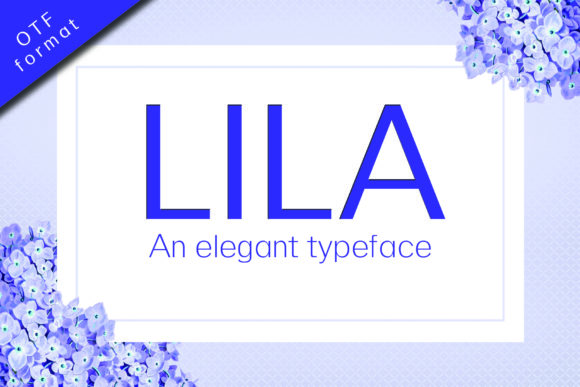
Lila: An Elegant Sans Serif Font for Thoughtful Design
When selecting a typeface, designers and communicators aren’t just choosing letters—they’re choosing tone, trust, and intention. Lila is an elegant sans serif font with charming character, designed to balance refinement and approachability. Its clean lines, subtle curves, and carefully considered proportions give it a sophisticated style—yet one that never feels cold or distant. Whether you're crafting a brand identity, designing a presentation, or refining a website’s typography system, Lila offers quiet confidence without shouting for attention.
Many professionals face recurring challenges when choosing fonts: balancing legibility with personality, ensuring consistency across digital and print media, and avoiding overused typefaces that blend into the background. Others struggle with fonts that look great at large sizes but break down in body text—or worse, fonts that feel “generic” despite their technical precision. These aren’t just aesthetic concerns; they impact readability, user engagement, and even perceived credibility. When your audience spends just seconds deciding whether to stay or scroll past, typography plays a decisive role—and Lila is built to earn those seconds back.
Why Lila Fits Real-World Design Needs
Lila was created with practical use in mind—not theoretical perfection. Its x-height is generous enough to support strong readability in UI interfaces and long-form web content, while its open counters and consistent stroke contrast help maintain clarity at small sizes and on lower-resolution screens. Unlike many minimalist sans serifs that sacrifice warmth for neutrality, Lila includes gentle modulation in its letterforms—a soft curve on the ‘a’, a graceful terminal on the ‘c’, a balanced asymmetry in the ‘e’. These details don’t distract; instead, they invite closer reading and foster a sense of care behind the message.
For marketers building email campaigns or landing pages, Lila supports both hierarchy and harmony: bold weights command attention in headlines, while the regular and light variants offer comfortable, fatigue-free reading in body copy. For editorial designers laying out digital magazines or newsletters, Lila provides reliable rhythm and spacing—especially when paired with thoughtful line height and character spacing adjustments. And for brand strategists developing visual systems, Lila scales gracefully from app icons to billboard signage, maintaining its integrity without needing extensive custom tuning.
Practical Applications Across Roles
Different users interact with Lila in distinct ways—each guided by unique goals and constraints:
- Web designers often use Lila as a primary font stack for modern, content-first sites. Its variable font version (if available) allows seamless weight and width control via CSS—reducing HTTP requests and improving performance. Pair it with a neutral monospace for code snippets or data tables to create contrast without conflict.
- Brand designers appreciate how Lila conveys sophistication without elitism—ideal for wellness studios, boutique consultancies, or sustainable product brands. It works especially well when set in all caps for logos or wordmarks, where its balanced letter spacing and refined terminals shine.
- Content creators and educators find Lila effective in slide decks and PDF handouts. Its clarity under projection and on printed paper helps audiences retain information longer. Try using Lila Light for captions and Lila Bold for section headers to guide attention naturally—no extra icons or colors needed.
- UX writers and product teams rely on Lila for interface text because its letterforms reduce cognitive load. Characters like ‘I’, ‘l’, and ‘1’ are clearly differentiated—a small but critical detail for accessibility and error prevention in forms or dashboards.
Getting the Most From Lila: Smart Implementation Tips
Like any powerful tool, Lila delivers best results when used intentionally—not just installed and applied. Here are actionable recommendations:
- Start with purpose, not preference. Before choosing Lila, ask: What feeling should this text evoke? Who needs to read it—and where? If your goal is calm authority (e.g., financial reports or healthcare resources), Lila’s restrained elegance fits naturally. If your aim is energetic youthfulness, another option may serve better.
- Test at real-world sizes. Preview Lila in context—not just in design software, but on actual devices. Check how it renders at 16px in a paragraph on mobile Safari, or at 24px in a desktop modal. Adjust tracking slightly (+10–20 units) for all-caps usage to preserve breathability.
- Respect hierarchy through weight—not size alone. Instead of jumping from 18px regular to 32px bold, try keeping size consistent and shifting only weight (e.g., Lila Regular 20px → Lila SemiBold 20px). This maintains rhythm and improves scannability.
- Pair thoughtfully, not arbitrarily. While Lila stands confidently alone, it pairs beautifully with understated serifs (like EB Garamond or IBM Plex Serif) for print layouts, or with clean geometric sans serifs (like Inter or Manrope) for UI systems requiring functional contrast.
A Font That Supports, Not Overpowers
What makes Lila especially valuable today is its restraint. In an era of bold gradients, animated text, and experimental variable fonts, there remains deep power in clarity, consistency, and quiet confidence. Lila doesn’t compete with your message—it clarifies it. It doesn’t demand attention—it earns it, steadily and respectfully.
That’s why designers working on mission-driven projects—nonprofit annual reports, educational platforms, patient-facing health tools—often return to Lila. It communicates competence without condescension, beauty without pretense. And because it performs reliably across browsers, operating systems, and assistive technologies, it supports inclusivity by default—not as an afterthought.
If you’ve been searching for a font that feels both timeless and current, professional yet personable, structured yet expressive—Lila is worth your time. It won’t solve every design challenge on its own, but it will elevate every sentence, headline, and interface it touches. And in the end, that’s what great typography does: it removes friction, builds trust, and lets the human voice come through—clearer, calmer, and more compelling.