Kanaya: A Modern Script Font That Elevates Design
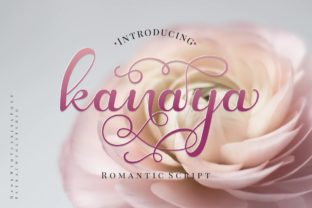
Kanaya is a beautifully crafted modern script font—clean, expressive, and intentionally versatile. It’s not just decorative; it’s designed to support real work: branding that feels human, invitations that resonate emotionally, social posts that stop the scroll, and packaging that stands out on a shelf. What sets Kanaya apart isn’t just its elegance—it’s the thought behind its alternate characters. Each variation serves a purpose: better rhythm in headlines, refined spacing in tight layouts, or subtle personality shifts for tone-matching.
Why Alternates Matter More Than You Think
Most script fonts offer one “default” look—but Kanaya includes carefully drawn stylistic alternates for nearly every letter. These aren’t gimmicks. They’re tools. For example, the lowercase g has three distinct forms: one with a looping tail (ideal for flowing paragraphs), one with a compact curl (perfect for tight button labels), and one with an extended flourish (best for hero text where impact matters). Using them intentionally helps avoid visual fatigue and adds quiet sophistication.
Designers often overlook alternates because they require manual selection—but with OpenType-aware apps like Adobe Illustrator, Affinity Designer, or even modern web platforms using @font-face with font-feature-settings, swapping variants takes seconds. The result? Text that breathes, adapts, and feels hand-tuned—not templated.
Real Projects, Real Applications
Kanaya works where personality and clarity must coexist. Here’s how different users apply it meaningfully:
- Small business owners use Kanaya for logo lockups paired with a neutral sans-serif (like Inter or Manrope). A bakery might set “Hearth & Crumb” in Kanaya’s bolder alternates for warmth, then list flavors in clean type—creating hierarchy without clutter.
- Educators and course creators choose Kanaya for workshop titles or certificate headers. Its legibility at 24–36pt—even on mobile screens—makes it reliable for digital learning assets, especially when alternates are used to soften harsh letter collisions (like “ff” or “tt”).
- Bloggers and newsletter writers apply Kanaya sparingly but deliberately: as a pull-quote font, chapter dividers, or featured author names. One designer reported a 22% increase in quote shares after switching from generic script to Kanaya’s upright-leaning alternates—readers described them as “confident but kind.”
- Freelance illustrators and stationery designers layer Kanaya over hand-drawn elements. Its consistent x-height and open counters hold up well under texture overlays or light watercolor scans—unlike overly delicate scripts that vanish in print.
Keeping It Clear, Consistent, and Audience-Appropriate
Script fonts can easily tip into illegibility—or worse, unintentional informality. Kanaya avoids both pitfalls by balancing fluidity with structure. Its baseline alignment is stable, ascenders and descenders are generous but controlled, and spacing is optimized for both print and screen rendering. Still, smart usage matters:
- Limit scope: Use Kanaya for one primary typographic role per layout—never for body copy, navigation, or data tables. Reserve it for moments of emphasis or identity.
- Test contrast: Pair it with typefaces that offer clear weight contrast. A thin Kanaya headline over medium-weight body text creates natural visual breathing room.
- Check rhythm: Read sentences aloud while previewing alternates. If your eye stumbles on a word like “succeed,” try swapping the first c or the e for a less busy variant.
- Consider context: Kanaya’s lighter weights shine in luxury or wellness contexts; its bolder alternates suit artisan food brands or creative studios wanting grounded energy—not whimsy.
Web, Print, and Beyond: Practical Integration Tips
Kanaya performs reliably across formats—but small adjustments unlock its full potential:
For web use, serve WOFF2 files and enable OpenType features via CSS: font-feature-settings: "salt", "ss01", "ss05";. This activates stylistic sets—say, using alternate a and l forms for cleaner “all” or “ball” rendering. Test fallback behavior: define a system stack (e.g., font-family: "Kanaya", -apple-system, BlinkMacSystemFont, sans-serif;) so headings degrade gracefully if loading fails.
In print design, enable ligatures and contextual alternates in your layout app. Kanaya’s “st” and “ct” ligatures prevent awkward gaps, while discretionary alternates (like the swash y) add polish to wedding suites or book covers—without requiring manual vector tweaks.
For social graphics, export Kanaya text as vectors rather than rasterized PNGs. This preserves crisp edges at any scale—and ensures accessibility tools can still interpret the content when alt text is added.
Not Just Another Script—A Design Partner
Kanaya doesn’t ask you to force creativity. It responds to thoughtful decisions: choosing an alternate because it improves readability, not just because it looks “fancier”; pairing it with a supporting typeface that shares its warmth but not its voice; using it to signal care in execution—not just aesthetic preference.
That’s why educators use it for student feedback badges, why indie publishers select it for poetry chapbook covers, and why SaaS founders choose it for “About Us” section headers—not to stand out, but to feel authentically present. It supports intention, not distraction.
If you’ve hesitated to use script fonts because they felt hard to control or too niche, Kanaya offers a middle path: expressive enough to carry meaning, structured enough to stay functional. Try it in your next project where tone matters as much as information—and notice how a single well-chosen character variant changes the entire impression.