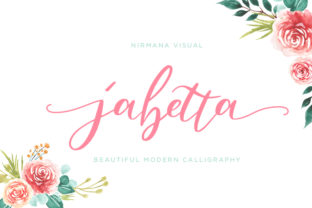
Jabetta: Organic Handwriting That Moves With Your Workflow
Jabetta isn’t just another script font—it’s a carefully crafted organic typeface born from real handwriting. Every curve, tilt, and connection was drawn by hand, then refined to preserve warmth and rhythm without sacrificing clarity or usability. It’s smooth in motion on screen, gorgeous in print, and deeply human in expression. That authenticity matters—not as decoration, but as functional texture in how you plan, present, teach, sell, or create.
Where Jabetta Fits in Real Workflows
Fonts don’t exist in isolation. They slot into moments: the first sketch of a workshop slide, the final polish on a client proposal, the handwritten-style headline on a product landing page, or the gentle emphasis in an email newsletter. Jabetta works where personality and approachability need to coexist with professionalism—without tipping into informality or sacrificing legibility.
It’s especially effective when you’re bridging intention and execution: before a project, it helps set tone and expectation; during, it adds cohesion across touchpoints; after, it reinforces brand voice in deliverables like reports, certificates, or thank-you notes. Unlike display fonts that shout, Jabetta invites—quietly, confidently, consistently.
Before the Project: Setting Intent With Intentional Type
Before drafting a presentation, designing a course module, or launching a small business website, many creators spend time defining voice and visual rhythm. Jabetta serves as both reference and tool in that phase. Drop it into mood boards, early wireframes, or internal briefs—not just for aesthetics, but to test how “human” your messaging feels at scale.
Try this: write three versions of your project’s core value statement—one in a neutral sans-serif (e.g., Inter), one in a high-contrast serif (e.g., Playfair), and one in Jabetta. Read them aloud. Notice where warmth lands, where pacing slows, where emphasis feels earned rather than imposed. That’s not stylistic preference—it’s alignment between message and medium.
During Creation: Seamless Integration Across Tools
Jabetta is designed for compatibility, not compromise. It supports OpenType features like contextual alternates and ligatures, which means letters adjust naturally as you type—no manual swapping needed. In Figma, Adobe Creative Cloud, or even modern web builders like Webflow, it renders cleanly at all sizes. For developers using CSS, it’s available via variable font files or standard WOFF2, making responsive use straightforward.
Pair it thoughtfully: Jabetta shines beside clean, highly legible text faces—think Inter, IBM Plex Sans, or Source Serif Pro. Avoid pairing with other decorative scripts or overly condensed fonts; contrast in structure—not ornament—creates balance. Use Jabetta for headings, quotes, callouts, or short labels. Let your body copy carry weight and breath.
For educators building lesson slides: apply Jabetta to learning objectives or reflection prompts. For freelancers drafting proposals: use it only on the cover title and signature line—not every subheading. For bloggers: reserve it for pull quotes or section dividers, not full paragraphs. Restraint preserves impact.
After Delivery: Consistency Without Repetition
A font’s long-term value shows up post-launch—in how easily it scales across new assets, maintains tone across teams, and holds up over months or years. Jabetta’s organic consistency makes it durable: because it’s based on real handwriting, it avoids the artificial uniformity that wears thin over time. There’s variation built in—subtle, intentional, unobtrusive—but no randomness that undermines trust.
Small business owners updating seasonal banners? Jabetta adapts without needing redesign. Publishers releasing quarterly newsletters? Its rhythm stays readable across formats—email, PDF, social image. Bloggers adding new content monthly? A single style guide entry (“Jabetta: Headings & Pull Quotes Only”) keeps usage aligned without micromanagement.
Practical Implementation Tips
- Start with hierarchy: Define exactly where Jabetta appears—never more than two weights (Regular and Bold) and never more than three use cases (e.g., H1, blockquote, logo lockup).
- Test readability early: At 16px on screen or 10pt in print, Jabetta remains clear—but avoid using it below those sizes for body text. It’s expressive, not exhaustive.
- Check contrast: On light backgrounds, pair with dark charcoal (#333333), not pure black (#000000), to preserve its softness. On dark backgrounds, use off-white (#F8F8F8), not full white.
- Embed wisely: If self-hosting, serve WOFF2 with fallbacks. In CMS platforms, confirm license coverage for web use—Jabetta’s licensing includes commercial web embedding, but always verify scope for your deployment method.
- Train, don’t assume: Share a 60-second Loom video with your team showing *where* and *why* Jabetta is used—not just how to install it. Context prevents misuse.
Workflow Synergy: How Jabetta Works With Other Assets
Jabetta doesn’t replace systems—it complements them. It integrates cleanly with design tokens in Figma libraries, aligns with typography scales in design systems, and respects accessibility standards when used within proper contrast and sizing boundaries. It enhances—not competes with—your existing tools.
In Notion workspaces, use Jabetta-inspired heading styles in exported PDFs (via custom CSS or export plugins). In Canva templates, apply it to branded slide headers while keeping body text in system fonts for editing speed. In email campaigns, embed it safely in hero images or SVG-based headlines—knowing fallbacks are in place for inbox clients that don’t support web fonts.
It also pairs well with tactile workflows: if you sketch wireframes by hand before digitizing, Jabetta’s natural flow mirrors that transition. If you record voice notes before writing, its rhythm echoes spoken cadence—making transcribed content feel less edited, more grounded.
Long-Term Use: Quality Control and Evolution
Over time, fonts can drift—used too broadly, applied inconsistently, or updated without documentation. Jabetta avoids that risk through deliberate limits: its character set covers Latin-based languages thoroughly, but doesn’t stretch into Cyrillic or CJK, keeping focus sharp. Its OpenType features are purpose-built—not flashy, but functional—supporting real-world multilingual needs without bloating file size.
To maintain quality control: audit usage quarterly. Open three recent deliverables—check whether Jabetta appears where intended, whether spacing feels balanced (especially around punctuation), and whether fallbacks behave gracefully. Update your internal style guide if roles change (e.g., a new designer joins, or a marketing intern starts drafting social posts).
And remember: Jabetta evolves with your work, not the other way around. It doesn’t demand overhaul—it asks for thoughtful placement. When you choose it for a workshop title, you’re not selecting a font. You’re signaling openness. When you apply it to a certificate of completion, you’re affirming care. When you use it in a pitch deck’s closing line, you’re grounding ambition in authenticity.
Final Thought: Process Before Polish
Jabetta works best when treated as part of your process—not just the final flourish. It’s most effective when chosen deliberately, tested iteratively, and applied with restraint. That doesn’t mean holding back—it means investing attention upstream, so downstream execution feels effortless. Whether you’re launching a course, refining a brand identity, or simply sending a more memorable email, Jabetta offers organic smoothness that supports, rather than overshadows, what you’re trying to say.