Ecustic: A Handwritten Font That Fits Your Workflow—Not the Other Way Around
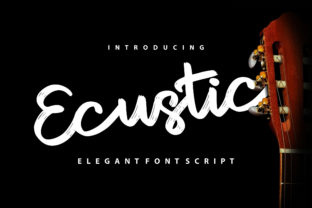
Ecustic is a simple, yet fun handwritten font with an authentic vibe. It doesn’t shout. It doesn’t overdesign. It leans in with warmth and quiet confidence—like a well-worn notebook you reach for before typing anything else. For professionals, creators, educators, and small business owners who balance clarity with personality, Ecustic isn’t just another typeface. It’s a subtle but intentional tool that supports how you think, plan, and connect—before, during, and after the work gets done.
Where Ecustic Lives in Real Workflows
Most fonts are chosen at the end of a process—when visuals are locked, branding is approved, and everything must “look right.” Ecustic works differently. It often enters earlier: during ideation, note-taking, wireframing, or even client onboarding. Its casual feel lowers friction. When you’re sketching a lesson plan, drafting a newsletter outline, or mapping a customer journey, Ecustic helps ideas land more naturally—less polished, more human. That makes it especially useful for workflows where tone and trust matter as much as structure: educator handouts, freelance proposals, internal team briefs, or workshop materials.
It’s not about replacing system fonts or professional display type. It’s about having a reliable voice for moments when formality creates distance. Think of Ecustic as your go-to for the first draft of a pitch deck slide—not the final investor version, but the version you share with your co-founder to test resonance. Or the font you use in a Notion template for weekly reflection—not because it’s flashy, but because its rhythm matches how your thoughts flow.
Using Ecustic Before the Project Begins
Preparation isn’t just about checklists—it’s about setting the right mental tone. Ecustic supports this by softening the rigidity of early-stage planning. When you build a project roadmap in Figma or Miro, using Ecustic for headers or callout boxes signals “this is still evolving.” It invites collaboration instead of gatekeeping. Similarly, if you’re designing a course syllabus or workshop agenda, applying Ecustic to learning objectives or activity titles subtly reinforces approachability—especially for audiences who associate dense sans-serifs with bureaucracy or overwhelm.
Compatibility matters here. Ecustic is a standard OpenType font—no plugins, no web font hosting required for local use. Install it once on your machine, and it appears in any desktop app: Illustrator, Keynote, Pages, Canva (via upload), or even Obsidian with custom CSS. No setup delays. No version conflicts. That reliability means you can embed it into reusable templates—your “client discovery doc,” “lesson planner,” or “content calendar”—and know it will render consistently across devices and collaborators.
During Execution: When Personality Supports Clarity
During active work, Ecustic shines where legibility and character coexist. It’s not designed for long paragraphs or tiny captions—but it excels in short bursts: section headers in a pitch PDF, labels in an illustrated process diagram, handwritten-style annotations in a design mockup, or quote highlights in a blog post. Because its letterforms retain natural variation (subtle shifts in stroke weight and baseline), it avoids the robotic uniformity of many script fonts—making it easier to scan without sacrificing charm.
For marketers building email sequences, Ecustic works well in preview text or subject line accents—small touches that reinforce brand warmth without compromising deliverability. For educators creating printable worksheets, it adds visual distinction between instructions and student response areas, supporting cognitive separation without adding clutter. And for freelancers drafting scope-of-work documents, using Ecustic for key deliverables or timelines (while keeping body copy in a neutral sans-serif) creates hierarchy that feels intentional—not decorative.
Practical Integration Tips
- Pair intentionally: Use Ecustic alongside a clean, highly readable sans-serif like Inter, Lato, or Helvetica Neue. Let Ecustic handle voice; let the companion font handle function.
- Limit scope: Apply it to no more than two typographic roles per document—e.g., headings + pull quotes, or section dividers + call-to-action buttons. Overuse dilutes its authenticity.
- Test contrast early: While Ecustic has strong x-height and open counters, it performs best at 16pt and above on screen, and 14pt+ in print. Avoid light gray or low-contrast backgrounds.
- Respect platform limits: In web projects, serve Ecustic via Google Fonts (if available) or self-host with
@font-face. Avoid embedding in SVGs unless necessary—it increases file size without benefit.
After the Work Is Done: Consistency Without Compromise
Long-term use reveals what really matters in a font: does it scale with your growth? Does it stay legible across formats? Does it hold up when reused across teams or tools? Ecustic passes these quietly. Because it’s built with consistent spacing, clear punctuation, and full Latin character support (including accented characters and numerals), it transitions smoothly from a solo creator’s Notion dashboard to a shared Google Slides presentation to a printed client report—without requiring redesign or reformatting.
That consistency supports quality control. When your team uses Ecustic in agreed-upon contexts—say, all internal brainstorming docs or all customer-facing welcome kits—it becomes part of your operational grammar. Not a branding mandate, but a shared shorthand for “this is meant to feel grounded, personal, and real.” Over time, that builds recognition—not just visually, but experientially.
What Ecustic Doesn’t Do (And Why That Matters)
Ecustic won’t replace your primary UI font. It won’t auto-generate responsive web typography. It won’t solve alignment issues in complex layouts. And it’s not optimized for accessibility in body text—so don’t use it for paragraph-level content or small interface labels. Recognizing those boundaries isn’t a limitation; it’s clarity. Knowing where Ecustic fits—and where it doesn’t—lets you deploy it with purpose instead of habit.
That restraint is why it integrates so well with other tools. It complements—not competes with—project management apps (like ClickUp or Asana), design systems (Figma libraries), content calendars (Airtable or Notion), and learning platforms (Teachable or Thinkific). You don’t need to change your stack to use Ecustic. You simply add it where it lifts tone without adding overhead.
Making It Stick: One Practical Starting Point
If you’re new to using Ecustic, start with one repeatable context—not a full rebrand. Pick a single workflow where warmth and clarity intersect: your weekly team sync agenda, your student feedback template, your product launch checklist, or your personal goal tracker. Install the font. Apply it to headers and key action items only. Keep body text neutral. Then observe: does it make the document feel more inviting to engage with? Does it reduce hesitation when sharing early drafts? Does it help others read faster—or respond more thoughtfully?
That’s how Ecustic earns its place—not through novelty, but through repeated, low-stakes usefulness. It becomes less of a “font choice” and more of a quiet enabler: the kind of tool you stop noticing because it simply works, day after day, across projects and platforms.
Because at its core, Ecustic isn’t about handwriting—it’s about intention. It reminds us that how we present ideas shapes how they’re received. And sometimes, the most effective tool isn’t the flashiest one. It’s the one that shows up, consistently, with honesty and ease.