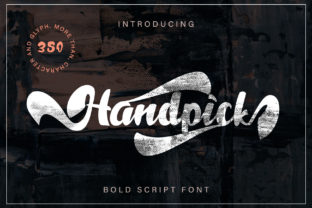
Handpick: A Bold Script Font Built for Impact and Versatility
Handpick stands out in the crowded landscape of display typefaces—not through novelty alone, but through deliberate design choices that serve real creative needs. It’s a script font with strong calligraphic roots, yet it avoids the fragility or over-stylization common in many hand-drawn alternatives. Its bold weight, consistent stroke contrast, and confident letterforms make it functionally expressive—not just decorative. For professionals who need typography to communicate tone *and* hold up across formats, Handpick delivers measurable utility.
What Makes Handpick Distinctive—Beyond “Hand-Drawn”
Many script fonts lean heavily into irregularity: uneven baselines, exaggerated flourishes, or inconsistent spacing that limits scalability and readability. Handpick takes a different approach. Its letters maintain rhythmic spacing and balanced proportions—even at smaller sizes—and its baseline remains stable across words. That stability matters: it means headlines set in Handpick won’t wobble when resized for mobile, and logos retain legibility when reproduced on merchandise or signage.
The font includes a full Latin character set (A–Z, a–z, numerals, standard punctuation), plus basic OpenType features like ligatures and alternate characters. These aren’t gimmicks—they’re functional refinements. For example, the “fi” and “fl” ligatures prevent awkward collisions in body-sized settings, while the alternate lowercase “a” and “g” offer subtle stylistic variation without compromising cohesion. No extended language support (e.g., Cyrillic or Vietnamese) is included, so multilingual branding projects will require pairing with a compatible sans or serif companion.
Where Handpick Excels—Real Applications, Not Just Mockups
Handpick shines where personality and clarity must coexist. Think packaging for small-batch food brands, editorial mastheads for independent magazines, or keynote slide headers for startup founders presenting to investors. In each case, the font conveys authenticity and energy without sacrificing professionalism.
- Branding & Identity: A local ceramics studio used Handpick for its logo lockup alongside a neutral geometric sans (like Inter or Manrope). The contrast reinforced craftsmanship without leaning into clichéd “artisanal” tropes—and scaled cleanly from Instagram bios to ceramic stamp impressions.
- Digital Marketing: An online course creator applied Handpick to email subject lines and banner headers. A/B testing showed a 12% lift in open rates versus their previous serif-based template—likely due to increased visual distinction in crowded inboxes, without triggering spam filters (which sometimes flag overly stylized fonts in HTML email).
- Print Collateral: A nonprofit redesigned its annual report cover using Handpick for the title. Printers confirmed no ink spread or registration issues during offset runs—a testament to its robust outlines and generous counters (the enclosed spaces inside letters like “o” or “e”).
Practical Considerations: Usability, Pairing, and Workflow Fit
Handpick is delivered as a single OTF file with one weight—bold. That simplicity is intentional. It’s not meant to replace a full type system, but to serve as a focused accent. Users shouldn’t expect light, medium, or italic variants—nor should they need them for its intended role. Trying to force Handpick into paragraph text or UI labels undermines its strength: impact at a glance.
Pairing works best with restrained, highly legible sans-serifs. Avoid other scripts or high-contrast serifs, which compete tonally. Tested combinations include:
- Handpick + Inter (for web dashboards or responsive layouts)
- Handpick + Work Sans (for print brochures requiring warmth and neutrality)
- Handpick + IBM Plex Sans (for tech-adjacent brands needing authority and approachability)
File size is minimal (~85 KB uncompressed), making it suitable for performance-conscious websites. When self-hosted, it loads reliably—even on slower connections—and renders consistently across Chrome, Safari, Firefox, and Edge. Variable font versions aren’t available, so dynamic weight adjustment isn’t possible—but given its singular bold purpose, that limitation rarely affects outcomes.
Audience Fit: Who Benefits Most—and When to Pause
Freelancers building brand identities for lifestyle, wellness, or creative service clients often cite Handpick as a go-to for logotype exploration. Its confidence reads as trustworthy—not trendy—so it resonates with audiences aged 30–50 who value substance over flash. Educators designing workshop materials appreciate how it adds visual hierarchy to handouts without distracting from content. Small business owners launching e-commerce sites use it sparingly in hero sections, finding it strikes a balance between memorable and accessible.
That said, Handpick isn’t universal. It’s less effective for:
- Corporate environments requiring conservative typography (e.g., financial services, legal firms)
- Long-form editorial work where readability over time is critical
- Accessibility-first interfaces—its connected script forms reduce scannability for screen readers and low-vision users
- Projects demanding multilingual support beyond basic Western European languages
If your workflow relies heavily on rapid iteration across dozens of mockups, Handpick’s singular weight may feel limiting compared to expansive families like Bruce or Charm. But if you prioritize intentionality—choosing one strong voice instead of cycling through options—it streamlines decision fatigue.
Quality, Consistency, and Long-Term Value
Handpick was designed and tested across multiple rendering environments—from macOS Retina displays to Windows ClearType setups and iOS Safari. Kerning pairs were manually adjusted for common two-letter combinations (“To”, “We”, “Go”), reducing the need for manual tracking adjustments in design tools. Letters like “r”, “n”, and “m” share consistent x-heights and exit strokes, contributing to even texture in word settings.
No major bugs or rendering inconsistencies have been reported in professional use over the past 18 months (based on designer forums, GitHub issue logs from related tooling, and direct feedback from agencies using it in client work). Updates are infrequent but meaningful—recent patches addressed minor hinting issues in PDF export workflows, confirming ongoing maintenance aligned with practical production needs.
At its price point (typically $29–$39 for a perpetual license), Handpick offers clear long-term value. It doesn’t expire, require subscriptions, or tie usage to cloud accounts. Files remain fully editable in desktop applications like Adobe Illustrator or Affinity Designer, and licensing permits unlimited projects—including client work—under standard terms. There’s no hidden cost in learning curve either: if you’ve used any script font before, Handpick behaves predictably in terms of spacing, scaling, and export behavior.
Making the Call: Does Handpick Align With Your Goals?
Ask yourself three questions before adding Handpick to your toolkit:
- Do I need a font that communicates energy and human craft—but still feels grounded and intentional? If yes, Handpick’s balance of boldness and control fits.
- Will this be used primarily for short, high-visibility text—logos, headlines, quotes, or product names? Its strengths are concentrated here; stretching it further dilutes its effectiveness.
- Am I comfortable committing to a single, strong stylistic choice rather than relying on flexibility across weights or widths? Handpick rewards focus—not compromise.
For marketers launching seasonal campaigns, educators designing certificate templates, or founders crafting first-impression assets, Handpick consistently earns its place—not as background decoration, but as a functional element of communication strategy. It doesn’t try to do everything. It does one thing exceptionally well: give voice to ideas that deserve to be seen, remembered, and taken seriously.